What cable do you need to connect a digital piano to a tablet? USB to Host, OTG adapters and USB-C on Android
 By Leonard Guelmino · Updated November 2026
For most digital pianos you need a USB-B to USB-C data cable: the square plug goes into the piano’s “USB to Host” port, the USB-C plug into your Android phone or tablet. If you already have a printer cable (USB-A to USB-B), add a USB OTG adapter from USB-A to USB-C. If your piano only has round MIDI ports, you need a USB MIDI interface instead.
Full disclosure: I built Stavewise, an app for learning to read music on a digital piano. The cables here work for any app that reads MIDI.
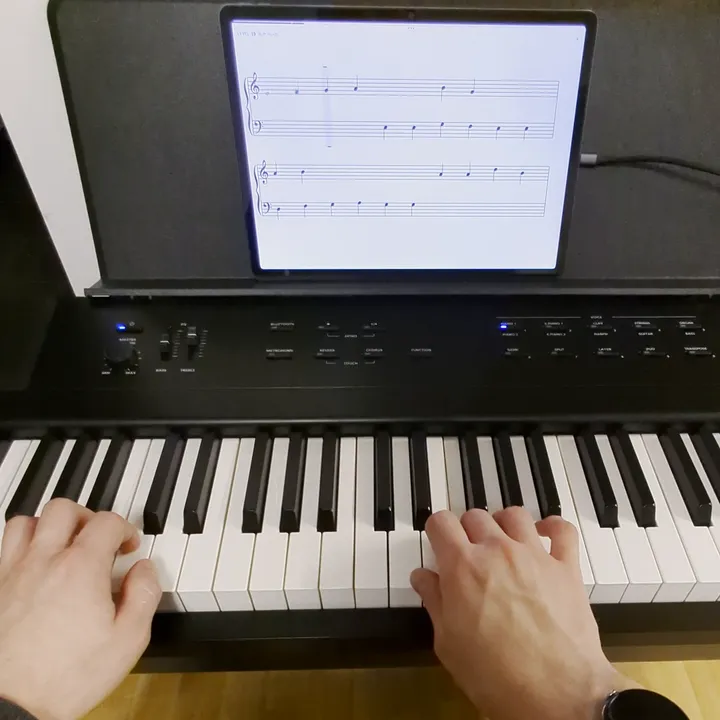
Which port does your piano have?
Look at the back panel or under the keyboard, or under “Connections” in the manual. You will find some of these:
- “USB to Host”, called “USB Computer” on Roland pianos: usually square, type B. This is the one you want. Kawai’s ES920 manual says it also connects tablets with adapters.
- USB-C as the “USB to Host” port, on a few newer models such as the Roland GO:PIANO88 (GO-88PX).
- “USB to Device”: flat, type A, like on a computer. It is meant for USB sticks, not for your phone.
- Round 5-pin ports, “MIDI In” and “MIDI Out”. Some pianos have only these and no USB at all, such as the Korg D1.
Which cable for which port
- Piano with USB-B, device with USB-C: a USB-B to USB-C cable. One piece, no adapter. This is how I connect my own piano.
- You already have a printer cable (USB-A to USB-B): add a USB OTG adapter with a USB-A socket and a USB-C plug. This is the same combination Yamaha’s Smart Pianist connection guide lists.
- Piano with USB-C: a USB-C to USB-C cable. Yamaha lists this cable for pianos with USB-C. I could not test it myself; my piano has USB-B.
- Older device with Micro-USB: a USB OTG cable from Micro-USB to USB-A, plus the printer cable. That is what Casio’s connection help says.
A data cable, not a charging cable
Some USB-C cables only charge and carry no data, and you often cannot tell from the outside. Casio puts it briefly: use a cable suitable for data communication, not a charge-only cable. A cable that copies photos from your phone to a computer is a data cable.
The same goes for the adapter: if the box says “OTG”, it is made for accessories like keyboards, sticks or a piano. Make sure the adapter is sold as a USB OTG adapter.
Only round MIDI ports: a USB MIDI interface
A USB MIDI interface has round MIDI plugs on one side and USB on the other. For an app that teaches reading music, the direction from piano to device is enough: the matching plug goes into the piano’s “MIDI Out”, the USB plug into your phone, directly or through an OTG adapter.
Pick an interface sold as “class compliant”. Android handles USB MIDI by the USB device class standard and does not load drivers from manufacturers. An interface that needs its own driver on a computer usually does not work on a phone.
I have not tested this route myself; the KA-E1 has USB and Bluetooth MIDI.
Charging while you practise
With the piano plugged in, the USB-C port is taken. My Pixel 7 Pro does not charge then. What helps:
- Charge before a long session.
- If your piano has Bluetooth MIDI, the port stays free for charging. On some pianos USB MIDI is switched off while Bluetooth MIDI is connected, for example the Kawai ES920. You do not need both at once.
- There are OTG adapters with an extra charging port. Whether your phone then charges and still sees the piano depends on the phone and the adapter. I have not tested it.
What I tested this with
My cable is USB-B to USB-C, no adapter, between my Kurzweil KA-E1 and a Lenovo Tab P12 running Android 15 and a Pixel 7 Pro running Android 17. The piano showed up in the app on its own every time. The screenshot shows an exercise in Stavewise.
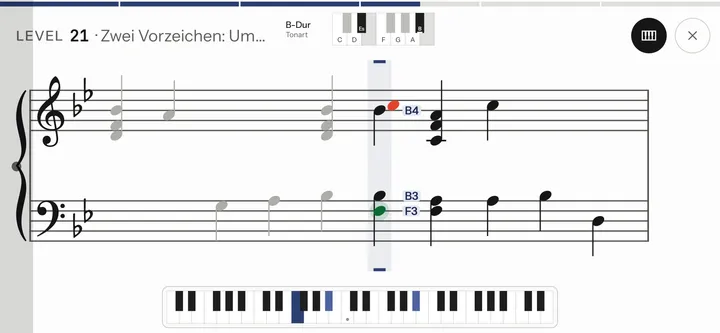
I have not tested adapters, pianos with USB-C or MIDI interfaces; for those I rely on the manufacturers’ manuals linked above.
Questions
What is a USB OTG adapter?
OTG stands for USB On-The-Go. It lets an Android device act as a USB host and drive accessories such as your piano. The adapter turns the USB-C port into a USB-A socket that the printer cable fits into.
Do I need a USB 3.0 cable?
No. MIDI sends very little data, and USB 2.0 is plenty. A USB 3.0 type B plug is also taller and does not fit the usual USB-B port on a piano.
Do I have to change a setting on the phone?
Usually not. Some phones need USB OTG switched on in the settings first.
Which brand should I buy?
I do not recommend a brand. What matters is the right plug on each end, “data” rather than just “charging”, and “OTG” on the adapter.
Learn to read music by playing it
Stavewise trains sight-reading on your own digital piano: short melodies with both hands, on Android, over USB or Bluetooth MIDI. The beta test is running now.
More about the app: Stavewise →