Connect a digital piano to an Android phone or tablet with USB OTG or Bluetooth MIDI
 By Leonard Guelmino · Updated November 2026
Yes, you can connect a digital piano to an Android tablet or phone, in two ways: with a USB cable from the piano’s USB to Host port to the USB-C port of your device, or wirelessly over Bluetooth MIDI if your piano has it. For USB you need a USB-B to USB-C data cable, or a printer cable with a USB OTG adapter. Bluetooth MIDI is connected inside the app, not in Android’s Bluetooth settings.
Full disclosure: I built Stavewise, an app for learning to read music on a digital piano. These steps work for any app that reads MIDI.
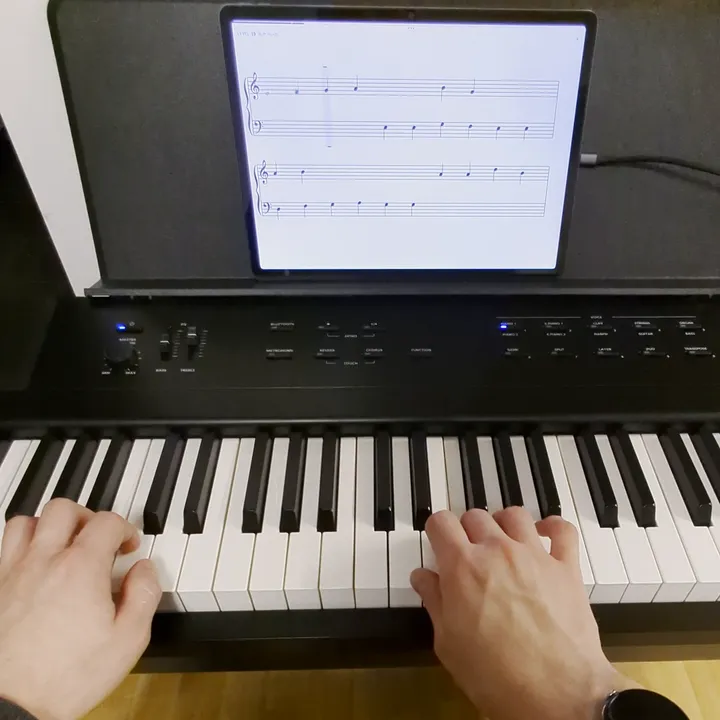
What you need
- A digital piano with a “USB to Host” port or Bluetooth MIDI. Look at the back panel or in the manual; some makers just call the port “USB” or “Computer”.
- An Android phone or tablet. Android has supported MIDI since version 6, but some apps need a newer version; Stavewise, for example, needs Android 12.
- For USB, a cable that carries data. For Bluetooth, nothing else.
- An app that reads MIDI: for learning to read music, practising, or recording.
Option 1: USB cable (USB OTG)
This is the more common route: many entry-level pianos have no Bluetooth MIDI, but nearly all have a USB port. A cable needs no search and no permission.
- Find the “USB to Host” port on the piano. It is usually square (type B); a few newer pianos use USB-C. “USB to Device” is a different port, meant for USB sticks.
- Use a USB-B to USB-C cable. Or take a printer cable you already have (USB-A to USB-B) and add a USB OTG adapter to USB-C. Charge-only cables carry no data and will not work.
- Switch the piano on, plug in the cable, open the app. The piano shows up in the app without pairing. Some phones need USB OTG switched on in the settings first.
While the cable is plugged in, the USB-C port is taken, so the phone does not charge. I charge before a long practice session.
Option 2: Bluetooth MIDI
- Check that your piano has Bluetooth MIDI. Many pianos only have Bluetooth audio, for playing music from your phone through the piano’s speakers. That is not enough.
- Turn on Bluetooth on the piano. On some models you also set it to MIDI in a menu; the manual explains how.
- Do not pair the piano in Android’s Bluetooth settings. The app finds the piano itself; allow it to access “Nearby devices”. Android’s Bluetooth settings do not handle MIDI. Piano makers say the same, for example the Kawai CA401 manual.
- Tap the piano in the app’s list. If Android asks you to pair, confirm it.
On my Kurzweil KA-E1 I could not feel any delay over Bluetooth. If you want to be safe, use the cable.
Piano not showing up?
- USB Is the piano on, and is the cable a data cable? Is it in “USB to Host”?
- USB With an adapter: is it a USB OTG adapter? If the box does not say so, it often is not.
- USB Unplug the cable, plug it back in, and reopen the app.
- Bluetooth Is Bluetooth on at the piano, and not already connected to another device?
- Bluetooth Is the piano listed under paired devices in Android’s settings? Remove it there and search again in the app.
- Bluetooth Does your phone show two entries, like “… Audio” and “… MIDI”? Only the MIDI one counts for the app.
- Both Does the app have the “Nearby devices” permission? Some apps ask for location instead.
What I tested this with
I tested both options with my own Kurzweil KA-E1, on a Lenovo Tab P12 running Android 15 and on a Pixel 7 Pro running Android 17. For USB I used a USB-B to USB-C cable, no adapter. The screenshot shows an exercise in Stavewise.
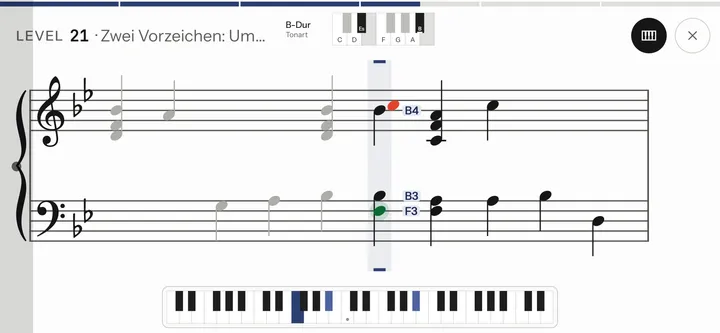
One piano and two devices do not prove that every model works. Your piano’s manual tells you which ports and which kind of Bluetooth it has.
Questions
Can you connect any digital piano to an Android tablet?
Only one with a MIDI output: “USB to Host”, Bluetooth MIDI, or a round 5-pin MIDI port (“MIDI Out”). For the round port you need a USB MIDI interface, plugged into USB-C directly or through an OTG adapter. Pick one sold as “class compliant”; you cannot install drivers on Android.
Which is better if my piano has both?
Both send the same notes. The cable connects without a search and has the edge on delay; Bluetooth keeps the music rest free of cables and leaves the USB-C port free for charging. Try both and keep whichever gets in your way less.
Does this work with a MIDI keyboard?
Yes. A MIDI keyboard or controller with a USB port connects the same way as a digital piano with “USB to Host”.
What about an acoustic piano?
An acoustic piano has no MIDI output. Some apps listen through the microphone instead; that is a different setup from the one here.
Will the sound come from the phone or the piano?
That depends on the app: some play their own sounds through the phone, others leave the sound to your piano.
And with an iPhone or iPad?
That works too, but the steps are different; this page covers Android.
Learn to read music by playing it
Stavewise trains sight-reading on your own digital piano: short melodies with both hands, on Android, over USB or Bluetooth MIDI. The beta test is running now.
More about the app: Stavewise →